Best Split Screen Games for PC
What is split screen?
Split screen is a classic local multiplayer format where the screen is divided into sections, giving each player their own view of the game. It's the essence of in-person multiplayer: you and your friends gaming on the same computer, each with their own slice of the screen.
This format dominated consoles for decades, but on PC it has always been rarer. The good news is that more and more games are bringing split screen support to PC, especially indie titles that value the local experience.
Why play split screen on PC?
PC has unique advantages for split screen gaming:
- Larger displays: 27"+ monitors or a big TV make the experience far more comfortable
- Flexible controls: mix keyboard + mouse with console controllers
- Superior performance: powerful PCs maintain stable framerates even when rendering two views
- Steam Remote Play Together: some local games can be played online with friends who don't own the game
Best split screen games for PC
It Takes Two
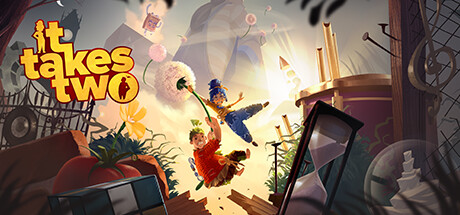
The Game of the Year 2021 winner is the definitive split screen experience. It Takes Two was designed exclusively for two people, with mechanics that change every chapter. Each puzzle requires real cooperation, and the story about a couple in crisis is surprisingly touching.
Overcooked! 2
Culinary chaos for up to 4 players. Overcooked! 2 puts your group in increasingly absurd kitchens where communication and coordination are essential. Perfect for laughs (and possibly some friendly arguments).
A Way Out
From the same creators as It Takes Two, A Way Out is a prison break adventure that runs entirely in split screen. The game alternates between action, stealth, and narrative moments, always with both players cooperating.
Rocket League
In split screen, Rocket League allows up to 4 players on the same PC, each with their own section of the screen. Quick matches of car soccer are perfect for in-person sessions.
Castle Crashers
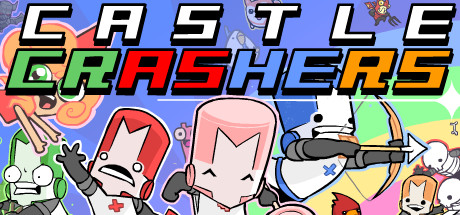
Hack-and-slash action with cartoon visuals for up to 4 players. Castle Crashers is simple, fun, and works perfectly in split screen on PC.
Human: Fall Flat
Physics puzzles with intentionally clumsy controls. Human: Fall Flat is hilarious in a group, especially when everyone is trying to cooperate on the same screen and chaos takes over.
Setting up split screen on PC
What you need
- Controllers: Most split screen games require at least one controller. Xbox controllers are the most PC-compatible
- Large screen: Ideally 27" or bigger. TVs work great
- Long HDMI/DisplayPort cable: If you're connecting your PC to the living room TV
Basic setup
- Connect controllers to your PC (USB or Bluetooth)
- Windows should recognize them automatically
- Open the game and look for "Local Multiplayer" or "Split Screen" option
- The second player usually joins by pressing a button on their controller
Steam Remote Play Together
If your friends aren't physically there, Steam Remote Play Together lets you share local games over the internet. Only the host needs to own the game. It's as if your friend were sitting next to you, with their controller input streamed over the network.
Find split screen games
Use our split screen filter to find all games with split screen support on PC.
Browse Split Screen GamesSplit screen vs. local co-op: what's the difference?
Many people confuse the two terms:
- Split screen: The screen is literally divided. Each player sees their own perspective
- Local co-op: Players share the same view of the screen. Games like Overcooked and Castle Crashers are local co-op (shared camera)
Both are forms of local multiplayer, but the experience is different. In split screen games like It Takes Two, each player can explore in different directions. In local co-op with a shared camera, everyone needs to stay in the same area.
On FindOurGame, you can filter by split screen to find games with divided views, or by local co-op for all games that work on the same machine.
Tips for a great split screen session
- Test controllers before starting. Calibrate deadzone and sensitivity. Each player should be comfortable
- Adjust brightness and HUD size. On smaller screens, you may need to increase the interface size
- Agree on the game beforehand. Not everyone likes the same genres. Have 2-3 options ready
- Take breaks. In-person sessions can be intense. Snack runs and hydration breaks are part of the experience
Perguntas Frequentes
How many controllers do I need for split screen on PC?
It depends on the game and number of players. For 2 players, usually 1 controller is enough (the other uses keyboard + mouse). For 3-4 players, each person needs a controller. Xbox controllers are the most compatible.
Does every PC game support split screen?
No. Split screen is relatively rare on PC. Many games that have split screen on console don't include the option on PC. Use our split screen filter to find the ones that do.
Can I play split screen on a small monitor?
Technically yes, but the experience isn't ideal. On a 24-inch or smaller monitor, split screen can feel cramped. We recommend 27 inches or larger, or connecting your PC to a TV.
Does Steam Remote Play Together work well?
For most games, yes. Quality depends on both players' internet connections. Slower games (puzzles, platformers) work better than fast-paced action games.